Section outline

    • Welcome to Accessible by Nature: Designing EE to Support All Learners 

      This course content was designed by Michelle Silvers of Silver’s Lining PLLC, Estrella Risinger with the Association for Environmental and Outdoor Education, Michelle Pearce and Lauren Pyle with the Environmental Educators of North Carolina, with contributions from Rebekah Jones and the Cooper Center for Environmental Learning.

      This course encourages you to reflect deeply on your practice to focus on how you plan and teach, not just the content you teach. While the course content is directed toward educators who will need to reflect on their physical teaching location and in-person teaching methods, we believe that educators who don’t have a specific location, or who may teach remotely, will still gain resources and skills for more inclusive and accessible practices. Whether you’re a classroom teacher or outdoor nonformal educator, an experienced professional or just getting started in the field, or new to inclusion or a longtime inclusive programmer, we hope this course will inspire you to strengthen your pedagogical practices so they are more welcoming, inclusive, and accessible for all learners.

      Objectives and Expectations

      Course Objectives:

        • Understand the principles of Universal Design for Learning (UDL).
        • Describe terms, techniques, tools, and resources to promote inclusivity and access to better serve diverse populations, specifically those with learning differences, physical accessibility needs, and language barriers.
        • Evaluate your current teaching practices/pedagogy and your setting to identify barriers to participation.
        • Apply the principles of universal design for learning to your pedagogical practices to redesign a lesson, activity, or program.
      As a student of this course, it is expected that you:
        • Commit the time required to complete all readings, assignments, and assessments.
        • Input appropriate answers and responses in the Course Journal and handouts, or through submissions of art, poetry, video, or recorded spoken word addressing the same topics.
        • Complete Modules 1-4 and their associated assignments, as well as submit the final course assessment.  You will have 6 weeks to complete the course upon enrollment.

      Prerequisites

      Experience working in Environmental Education is not required but highly encouraged.

      Grading

        • Periodic assessments throughout each module must be completed with at least a score of 2 as indicated on the scoring guide provided. 
        • To receive a certificate of completion, you must complete all modules and receive the scores as indicated above.

      Pacing Guidelines

      While you may work at your own pace, we suggest adhering to the following schedule to complete all modules on time.

        • Module 1: 1 Week (recommended deadline: January 22)
        • Module 2: 2 Weeks (recommended deadline: February 5)
        • Module 3: 2 Weeks (recommended deadline: February 19)
        • Module 4: 1 Week (recommended deadline: February 26)

      Throughout the course, you will see deadlines for assignments and activities that correlate to these pacing guides. All work must be completed by the final course deadline: FJune 15, 2025. There is no penalty for submissions turned in after the suggested pacing dates as long as it is before the course deadline. You are always welcome to work ahead! Refer to the Course Calendar for those dates of the current course.

      Meet Your Course Moderator: Amy Williams, Ed.D.

      You will have one moderator for this course reviews your assignments and provide scores and feedback.  

      Amy has worked in the educational field for over 25 years, currently as a Program Manager for a non-profit education organization and prior to that Sanger Unified School District. She served all students first as a classroom teacher, then school psychologist, special education program manager, and K-8 principal. She has experiences in a variety of roles in both special education and general education providing a wide lens and varied perspective to support all learners within an organization. Amy has experience in developing, implementing and supporting district initiatives such as; Multi-Tiered Systems of Support (MTSS), Professional Learning Community (PLC), Response to Intervention (RTI), Positive Behavioral Intervention and Supports (PBIS), and Universal Design for Learning (UDL).

      Amy obtained her Ed.D. in Educational Leadership at California State University, Fresno. She co-authored, Demystifying MTSS: A school and district framework for meeting students’ academic and social-emotional needs. Her research and dissertation is focused on UDL implementation. has received degrees and credentials from California State University Fresno, California, B.A. in Psychology, Multiple Subject Teaching Credential, Education Administration and Supervision Clear Credential; Fresno Pacific University, M.A. in Education, Pupil Personnel Services Credential, Specialization School Psychology, and National University, Fresno, Certificate in Applied Behavior Analysis. If you have any questions during the course, please contact Amy at amywilliamssolutiontree@gmail.com. Please be sure to save this email address as you will be receiving periodic reminders and announcements from Amy throughout the course. 

      Logging Your Progress and Checking Your Grades:

      As you complete activities, there are a few ways to document your progress: 

        • For the journal reflections, readings, Padlets, etc., you will see a box labeled "mark as done" next to each task. Once you've completed the task, manually click that box to document your progress. This helps the moderator keep track, and will also help you know where you left off when you sign back in.  
        • For forums to be marked as complete, you need to submit the appropriate number of posts/replies as described in the directions. Video tasks need to be viewed. For tasks that ask you to submit or upload your completed work within Moodle, you can upload a file (ex: Word document, PDF, video, image, or another format), share a link to an online file (ex: Google doc link with view-only access), or copy/paste your response into the provided text box. Once you have done so, these tasks will automatically be marked as completed.  
        • At the end of each module, you will submit your course journal as an assignment. Once you upload your file or enter a link/text in the provided box, it will mark the module as complete and allow you to move to the next section. The moderator will be scoring assignments on a weekly basis. While you need to receive a score of 2 or higher on every module and the final action plan to complete the course, you can continue on to the next module before your journal is graded.

      As your course journals are graded, you'll receive notifications through Moodle. You can also view your scores and feedback from the moderator by clicking the Grades tab to the left. If you wish to add more information/complete more tasks after a module is scored, you can re-submit previous module journals for the moderator to update your score.


    • As you are moving through the course, there are several ways you can navigate through the materials.  

      To Move Between Modules: You can use the navigation tabs on the left to navigate between modules of the course.  

      To Open a Task: Forums, URLs, and assignment tasks are identified in the course in separate blocks with icons.  To open the task, click the icon.  After you complete the task, be sure to come back to the main module page by clicking the module title in the navigation bar on the left so you don't skip any tasks.
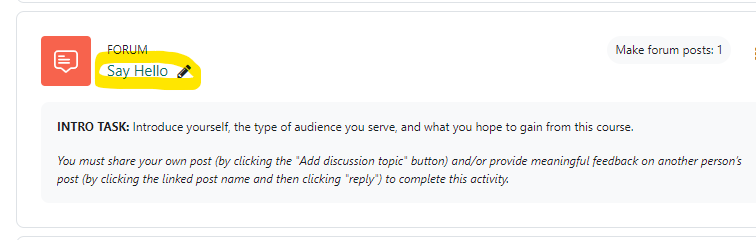
      a screenshot of a forum entitled "Say Hello".  The title is circled in yellow to show you where to click to open the forum.

      Based on previous student requests, most of our primary links default to open in a new tab.  Alternate links have also been provided when core course material (journals, worksheets) is first introduced, if you prefer to open links in the same window and/or need better integration with screen readers and mobile devices.

      Watch this video for a visual walk-through or view the video on YouTube in a new tab to turn on captioning (or open the video in YouTube in this window).